

Related Posts

Bowl Leader
Bowl Leader

Hello all and Happy Thanksgiving! Gratitude is so important for our wellbeing and meditation allows me to harness my gratitude without stop. Come join a free virtual guided meditation class tonight. Here’s the link: 🍃Topic: Lighten the Mind
Time: Nov 25, 2020 09:00 PM Eastern Time (US and Canada)
Zoom ID: 812 7894 8784
Zoom Link: https://us02web.zoom.us/j/81278948784
Bowl Leader

Bowl Leader


More Posts
How can I change the project in Accenture?


Enthusiast
Hey folks,
Looking for a career in the Fintech startup, where you can get a balanced life and work from anywhere!
Yes you heard it right !!
Here is the opportunity for Remote location
“WORK FROM ANYWHERE”
Looking for the candidates for the below mentioned positions
Company : GRIP Invest
Location : Gurgaon/ Remote
You can comment or email me for the JD if you are looking for the opportunity in the below positions
You can mail me at : prakruthi@gripinvest.in

Additional Posts in Excel Genius
Anyone have a good source to learn sql
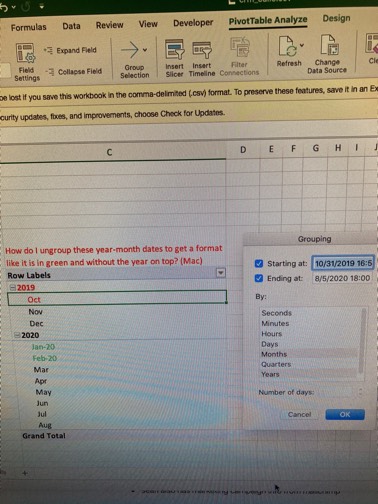
Would anyone be willing to teach me vlookup?
Everyone: Excel is a smart app
Excel:


New to Fishbowl?
unlock all discussions on Fishbowl.


You can add in a column. There's a formula, I think it's just DATE or DATEVALUE. Then use the LEFT/MID/RIGHT formulas to get the digits of the day/month/year into the right spots.
ex. =DATE(LEFT(I2, 4), MID(I2, 6, 2), RIGHT(I2, 2))
If a file crashes like that it means you have an issue with the file itself. Best bet is to move everything to a new sheet and then convert
Save it as a CSV file
Subject Expert
Just convert the dates (as text) to dates (as date) using either =DATEVALUE(), =MID() or text to columns
But just because your pivot table didn't group them, doesn't necessarily means that the dates are formatted as text. Pivot tables are just crappy
There's a way to force grouping date to pivot tables, but make sure it's formatted as date before trying it
You can just add a column with the month or week, if you need to group that way. No need to solve the problem if it takes up more time thar adding these new columns. MONTH() or WEEKNUM()
Create a calculated column with =year(date value)&month(date value). Pivot on this value
Year(date value)&”-“&if(month value<10),0,””)&month(date value) is how I would prepare my value to pivot on.
Pic1
Pic2
It looks like you have your dates in the PivotTable field for values right now. Do you want them grouped by row/column instead?
Pic3
Upload it into power query and change the column type
Excel on Windows or Mac?