

Related Posts

Look for ACN referrals. I am in Italy


Additional Posts in Excel Genius
Still don't have xlookup. #fomo



Coach
New to Fishbowl?
Download the Fishbowl app to
unlock all discussions on Fishbowl.
unlock all discussions on Fishbowl.

Look for ACN referrals. I am in Italy
Still don't have xlookup. #fomo
Coach
This site is protected by reCAPTCHA and the Google Privacy Policy and Terms of Service apply.
Download the Fishbowl app to unlock all discussions on Fishbowl.
Copy and paste embed code on your site

Scan your QR code to download
Fishbowl app on your mobile


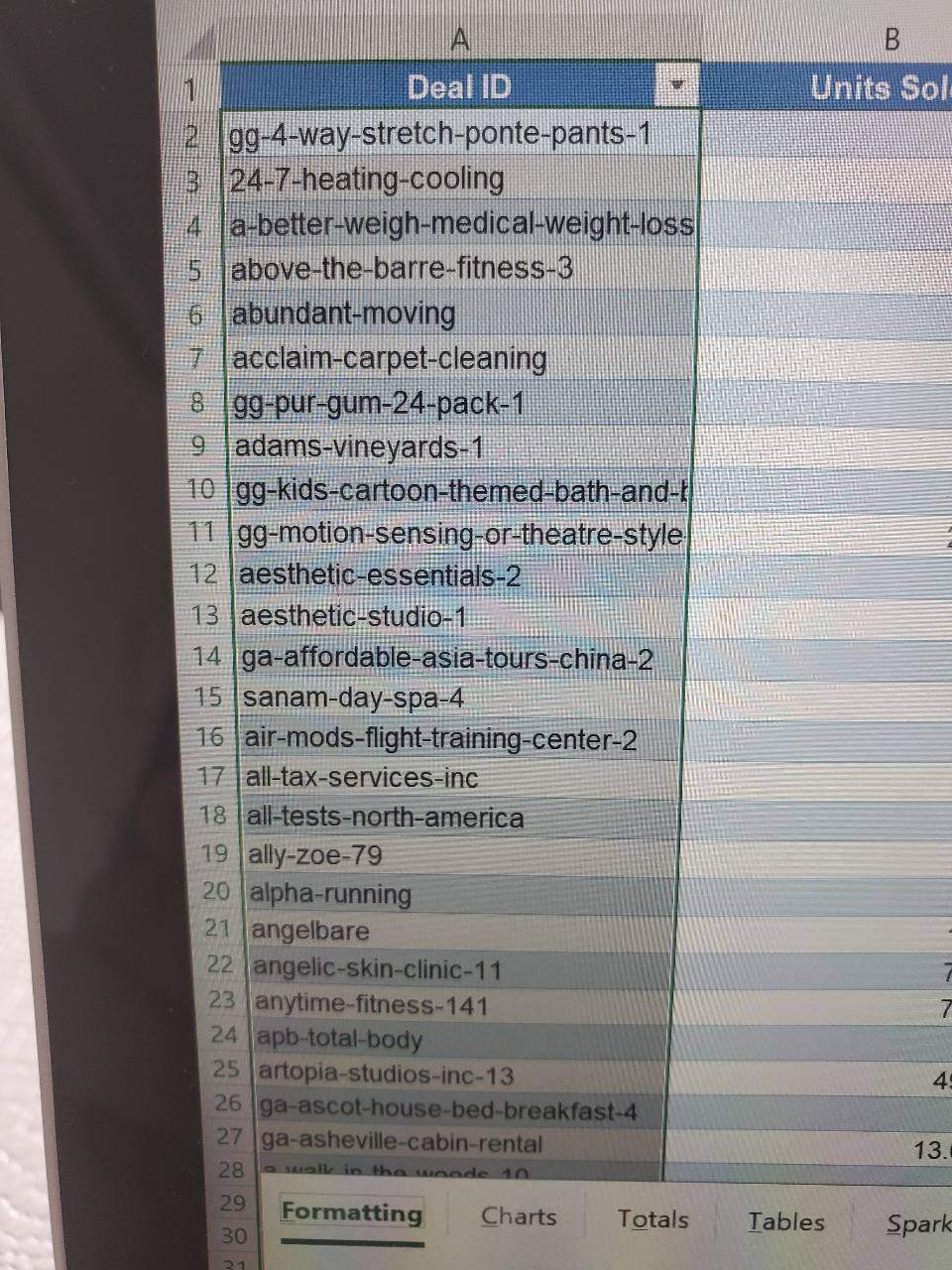
How long is the list? You can use the formula:
=LEFT(text,LEN(text)-n)
and manually apply the formula to the entries which have a number at the end.
Otherwise you'll have to create some sort of lookup formula that can identify a dash as the second last character in addition to the formula above.
Some don’t have numbers at the end though
=IF(ISNUMBER(VALUE(RIGHT(A2,1))),LEFT(A2,FIND("@",SUBSTITUTE(A2,"-","@",LEN(A2)-LEN(SUBSTITUTE(A2,"-",""))),1)-1),A2)
The best answer here, text to columns is prone to manual error with this
Text-to-Column
The problem is he also has -number format values in the earlier part of his cell which he intents to keep.
I think ultimately delimit by - May be the best way to go and then delete columns on the very end with numbers only. The dashes don’t really serve a big purpose where they will need to be added back in anyway for a deal ID
If one doesn't want to go with long formulas or VBA regex, always use one or two passages with CTRL+H and wildcards. It's the best tradeoff in terms of keys typed.
1. Search for "*-??" > substitute with ""
This will clean the ones ending with 2 num
2. Search for "*-?" > substitute with ""
This will clean the ones with only 1 num
Correct the "exceptions" manually if the list is <100-1000, go for formulas/VBA if not.
Yay! A fellow Notepad++ user
Text to column with the dash as the delimiter then recombine the other columns
This is a classic case for regular expressions. Replace on [0-9]+$ then replace. Vba library has regex functions.
Remove only the - and number at the end when they appear?
Looks like the values have different numbers of - and don’t always end in a number. Best bet would be a formula that checks if the value after the last - is a number and strip it if so
Also follow up. How can i break this into 10 day chunks?
Edate
n is the number if chars you want to trim (in this case 2)
If last char is a number trim all ending until first "-". Should be a quick if else left trim. Then copy and paste as values to have the text and not formula.
Until first appearing "-" from the end ofc
Altyrex yo
Would still love to know! :)
Newbs.
=IFERROR(LEFT(A2,FIND(“-“,A2,LEN(A2)-1)-1),A2)
=IF(ISNUNBER(VALUE(RIGHT(A2,1))),LEFT(A2,FIND(TRIM(RIGHT(SUBSTITUTE(A2,"-",REPT(" ",LEN(A2))),LEN(A2))),A2,LEN(A2)-1)-2),A2) 🥴
If you have teammate use the field manipulation to remove numerics from text data. Otherwise I would use something like the below formula: =if(iferror(value(right(A1,3-iferror(find(“-“,right(A1,3)),0))),0)>0,left(A1,len(A1)-iferror(find(“-“,right(A1,3)),0)),A1)