

Related Posts



Rising Star



Bowl Leader
Hey, Fishies! We’re launching our first Interview/Q+A series "Portfolio Rewind: Would You Hire You?"
Like a portfolio review in reverse, creative leaders will share work they created when they first started out and critique it as if were a book that had just landed in their inbox. Then, tell us if they’d hire their younger selves knowing, and expecting, what they do now.
Drop in for get the chance to ask questions, and get your book reviewed by our guest. Hope you can make it!
zoom.us/j/92635977143




Bowl Leader
Join us for our first virtual panel on Wednesday May 20th at 5 PM EST, Navigating the Ad Industry When the Economy Sucks. Tom Christmann & Paul Fix, award-winning NYC ad creatives and co-deans at Adhouse, will be joining us and taking questions.
https://zoom.us/j/94553752267
More info and calendar links in comments.

Bowl Leader
More Posts

Enthusiast
Is firm travel back up to pre covid levels?
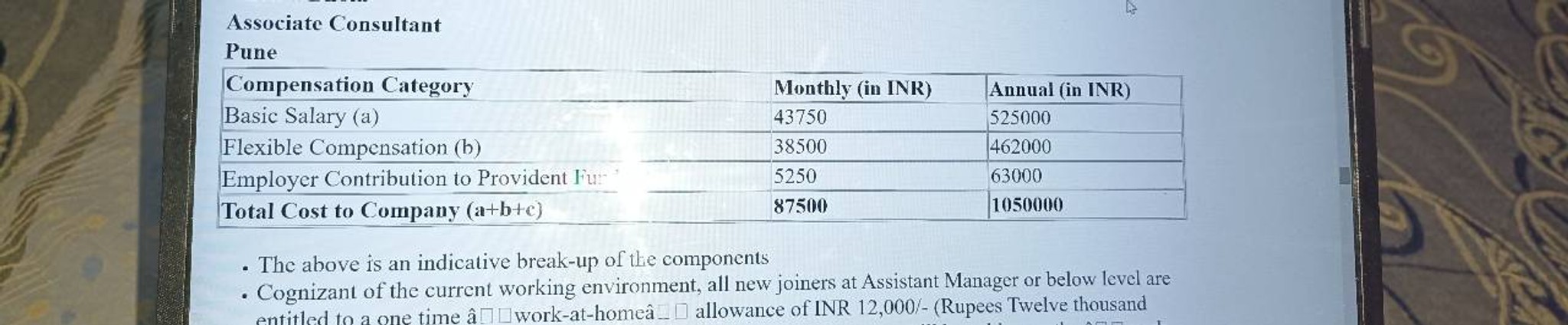
Hello Fishes, I have cleared both Technical and Manager rounds in Infosys. I have total experience of 3 years and relevant experience of 2.9 years in Java Full stack development. Currently holding an offer of 13LPA and ctc is 7.8 LPA.
Please help me regarding how much ctc I can expect/ask from Infy?
Thanks in advance.!
Infosys Tata Consultancy Cognizant

Pro
Additional Posts in Advertising
What agency is doing the new Twizzler ads?
Any advice for your LAST day in office?
How's the NYC freelance field these days?

New to Fishbowl?
unlock all discussions on Fishbowl.


Pro
You can up the resolution on tilt brush since it's natively meant for screen, best bet is to at least double the dimensions on the output and you'll be fine, although colors will be muted a bit converting from RGB to CMYK. But no one is going to fault you for getting a little blurry/haziness from a VR screenshot. If you aren't happy with the look you can always sharpen edges and add saturation back in using Photoshop, but if you really want it to look crisper, you might have to recreate portions of it on an art board with a larger resolution.
Thank you so much that’s super helpful
how far away is the person standing from the 30x40inch canvas? close? far away?
a way to test how well your image will print at that scale is to create an artboard in PS that’s going to represent a regular size piece of paper. let’s say 8x10”. put an important piece of your image inside that artboard at 100% scale (the person’s eye, a pattern, etc). now print at 100% on that piece of paper. you should have printed on an area of 8x10” on that paper. hang that paper up on a wall, and step back to where you think ppl will experience it (5ft back?). is it blurry?
make sure when you print you understand the diff between CMYK and RGB.
Printing something out!! What a concept! :P
Chief
My question is, how does someone get to ACD level and not know this? I get that print advertising is a dying medium but things are still printed. We haven’t achieved The Singularity just yet.
I'm my ad agency's print production department of one. And an aspiring AD. I try not to let this question keep me up at night. It's hard.
You're resampling it and making up pixels that didn't exist. That's why it's blurry.
your computer is only rendering so many pixels at once. the reason it’s sharp zoomed out is because there’s enough information to look sharp on screen, almost like if you were looking at a billboard from far away, but if you walked up close (zoomed in 100%) it may be blurry.
You can go to 150 or 200 dpi. The image is large enough. You’ll be fine!
Rising Star
No. Unless you are printing on canvas (like for a billboard) you need 280.
Your image is 3849x2160 pixels regardless of what you do to it. If it’s 300 dpi, the picture is roughly 12 inches wide (3849/300=size at 300dpi). If the printer is 600 dpi, you’ve got a 6 inch wide image, if it’s 150 (low for print) dpi it’s 24 inches wide. You can size it up but it will get blurry. Maybe you understand this already, but thought I’d explain it just in case. ✌️
going from digital to print is weird. consider this:
a 5in x 10in image at 72dpi has the same amount of pixels as a 1.2in x 2.4in image at 300dpi. both are 360pixels x 720pixels.
Pro
What program was used to create the image. Is it mostly graphic/vector or photography?
Yes, exactly. Both video and frame export are 3840x2160. I can also take a direct image export from within the headset and it would result in the same resolution
If you upscale in Photoshop, do it in increments of 5%. It makes a very slight but noticeable difference. You can also use the improved camera raw (cc 20) effects to bump up the sharpness a tad. Or high pass less than .3 ( or until the lines look thick) then set that to overlay. To answer your question in general it won't look sharp. But it will be crisp to a naked eye. Sharpening it with specific techniques will help
Super helpful thank you!
Thankfully, with AI, you can upscale your images. Here’s a free ai image upscale open source website. If you want better results, you can purchase some plugins or software
Free Open Source: http://waifu2x.udp.jp/
Tutorial: https://youtu.be/0_biCOruz80
Paid versions: https://youtu.be/5LrPKoNvPPc