

Related Posts



Bowl Leader


Conversation Starter

Rising Star
Bowl Leader

Mentor
Additional Posts in Excel Genius

New to Fishbowl?
Download the Fishbowl app to
unlock all discussions on Fishbowl.
unlock all discussions on Fishbowl.

Bowl Leader
Conversation Starter
Rising Star
Bowl Leader
Mentor
This site is protected by reCAPTCHA and the Google Privacy Policy and Terms of Service apply.
Download the Fishbowl app to unlock all discussions on Fishbowl.
Copy and paste embed code on your site

Scan your QR code to download
Fishbowl app on your mobile


Conditional formatting??
Have some sort of formula (whether it be a simple sum or an if yes/no on >1,000) it running concurrently to the hours that sums up the amounts above. Then use conditional formatting on that to highlight however you want.
Have a separate column for a running total?
Subject Expert
This is a VERY INTERESTING and COMPLEX question, both practically and conceptually (idk why SA1 think it's elementary, maybe he is above all of us mere mortals).
So you have a list of tasks which take some time and you need to "choose" tasks up to a maximum of 1k hours. The easy part is sum all of the hours, but the question is: how do you choose which tasks? First, you need to pass some criteria: do you want to do them in order, in priority, in difficulty? You gotta say to excel that. Second, and this is the tricky part, excel would need to calculate every option to be able to tell you which one is the best - it's a recursive thing and with O(n²) complexity, it's not a trivial thing to build.
My advice: either a) create a prioritization criteria and then rank them and keep summing untill it reaches 1k hour (or close), or just forger excel and go for python or something else. It will take some time, it's conceptually hard (it involves a lot of P<>NP concepts) and computer consuming - check out the "traveling salesman problem" to see why
Agreed. Python can truly do anything
Coach
I agree with EY. A new column with a running total. Let's say your values start in cell D2. Your formula in E2 would be =D2. Your formula in E3 would be =sum($D$2:D3). Then just copy down that formula through the end of your rows. Then just use conditional formatting for your result... if it's >=1000, highlight or whatever.
No offense or anything, but if you have this level of questions on excel, I suggest taking an excel 101 course and eventually move onto an advance level course
And yeah I could definitely improve my
skills from intermediate to advanced , hence why I joined the bowl :)
Very easy.
Creat a new row/tab that only summarizes the hour tab. This can be done by the formula =cell above + cell to the left. Then drag down all the way.
Then: make a rule for the complete tab that all numbers above 1000 be marked green.
You will then notice the cut-off by the colour green.
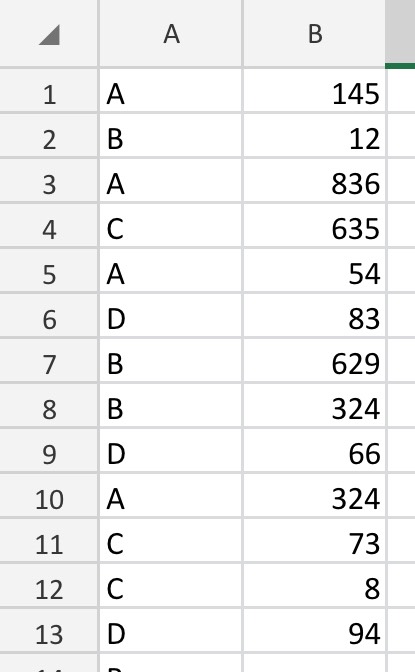
I made a simple version on my phone to illustrate the principle.
Need more details. What do you plan to do with the hours after?!
Nothing, I want to highlight where the cut line is, I.e, we can only do 1000 hours of work here, so that equals down to x amount of activities based on the hours allocation
You need a cumulative sum. Make a new column, add what is on the left and what is on top of the cell. Then drag down. You can set conditional formatting to highlight whatever is more than 1000.
Can you show us a sample of the data?
Could use a min function min(10,0000,sum(A:A)).
that will pick the actual sum up to 10,000 then youll get 10000 no matter how much above that AA is.
I would use conditional formatting to highlight values over 1000 then filter by color
I totally get it! I was struggling with Excel too. I made a simple formula with the SUM function to track hours as I added activities. Used conditional formatting to highlight the cell at 1000 hours. I found help at https://essays.edubirdie.com/excel-help, and it seriously saved me. Excel skills are a must, and this service makes life easier for sure.