

Related Posts



Has anyone taken the CAIA ? Any tips ?

Additional Posts in Excel Genius


Anyone know what these badges are?



Visual Storyteller

Coach
New to Fishbowl?
Download the Fishbowl app to
unlock all discussions on Fishbowl.
unlock all discussions on Fishbowl.


Mentor
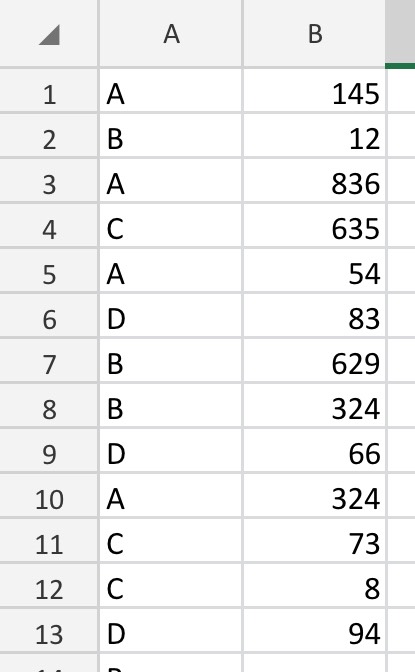
=COUNTA(UNIQUE(FILTER(range,(condition1=criteria1)*(condition2=criteria2))))
Lemme know if something isn’t clear in the formula above
Gonna save me so much time now lol. I’ve been manually changing filters on a pivot table to get each number and now I just can copy the columns into a table that tracks this over time. At some point I’ll just add a column for a timestamp of each report and not deal with having to replace the input data, just filtering each row of that report on the date.
=SUM(1/COUNTIFS(Findings[[#All],[Operating System]],"*Windows*",Findings[[#All],[Operating System]],"<>*Server 2008*”,Findings[[#All],[UUID]],Findings[[#All],[UUID]]))
Is the function im getting. I’m looking for a count of distinct UUIDs that are windows but not server 2008. It looks like it tries to divide by 0 in some rows and fails
So I ended up redoing all this in PowerBI (excel prob would also work since it’s all Dax/m, powerquery, and the data model but I needed to share reporting too) and doing a lot of this with related tables has worked a lot more nicely. The solution I was using within excel worked for the single time period where I was testing lol. Shortly after, server 2012 hit end of life and I would have needed a new query for it.
Now I’m just storing the EOL date in a table and comparing it to a reporting date.
Looks like you’re almost there.. =SUM(1/COUNTIF(range, range)) should work as long as you turn it into an array formula by using the CTRL + SHIFT + ENTER keys
I did try that but it turned out my RDP client was not sending one of the keys correctly (iPad connected to a windows desktop so I can use the data model stuff ) but I’m still getting the div/0 stuff after working around that. If I had an empty column somewhere Itd make sense but the columns I’m checking are all populated.
Probably should try this with a smaller subset of the data lol