


Related Posts

Bowl Leader


Pro

Coach

Conversation Starter

More Posts
Anyone interested in career help? 🙂

2022 marketing wrapped



Visual Storyteller
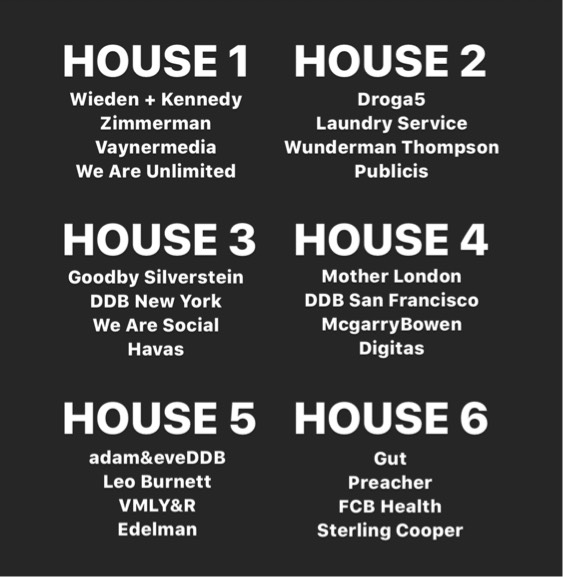
Which house are you choosing? 😎
Additional Posts in The Worklife Bowl
Pro
Conversation Starter
Please and thank you!


Pro

Enthusiast
What ever happened to choco tacos :/

Rising Star

Chief

Chief

The court of public opinion needs a mediator 😩
Rising Star
What are y’all doing with the $600 Checks?!

Enthusiast

Pro
New to Fishbowl?
Download the Fishbowl app to
unlock all discussions on Fishbowl.
unlock all discussions on Fishbowl.


Get 2 monitors. It will increase productivity. 3 would be excessive. With 2 you can have one screen for email/chats while another screen to review documentation like excel/word.
Get monitors at least 23-24 inch diagonally with modern ports like DisplayPort. HDMI should be the lowest quality port you get. Find adaptors or docks to hook up to your computer/laptop if needed.
https://www.amazon.com/dp/B088VMY23M/ref=cm_sw_r_cp_api_i_tVSsFbC3XMDFZ
Buy an ultra wide monitor. You can arrange 3 windows side by side as well on it plus use your laptop as a 4th screen. Doing screen share on the wide monitor is not great for others watching your screen so sharing the laptop screen works best. I sometimes connect two laptops on the same monitor too. And google chromecast to watch tv, when I’m tired. I have a Dell U3419W. Usb-c, hdmi, displays port, picture in picture. I love it.
HDMI is fine. Many Laptops don't have Display port. If it is really just for a home office then 144hz as suggested before is unnecessary. Dell has good quality screens, but basically anything around $200 will already do the trick.
#UltraWideMasterRace bought a 34” 3 years ago, one of the best purchases I’ve ever made
Enthusiast
Get a 27" 1440p 144hz monitor. If you have the budget, get 2 of them for dual screening. My personal recommendation is the LG 27GL83A-B.
Hook them up to your GPU via DisplayPort instead of HDMI, since DisplayPort allows more bandwidth. Just make sure your GPU is capable of such output (any modern GPU will suffice).
You will thank me later.
Enthusiast
A couple 24s or a 27 or two would be good, but I agree with D1, 144hz is way overkill for office work
I went with two 27" 2k monitors from BenQ and they have an anti-eye fatigue design that I didn't think I'd care about but has made a big difference for me... I wish the bezel was thinner but didn't want to pay extra. I know some folks like those ultrawide monitors but I like the ease of dual monitors for sharing entire screen, etc. Interested to know how you do that on an ultrawide 🙃
Sharing the specific window is always a headache because we're flipping around from Browser to Excel to PowerPoint a lot in my delivery projects.
Enthusiast
LG 34’ - highly recommend
Not sure how much space you have. I have a fairly small desk and I didn’t want to totally block my window (natural light > blue light) so I bought a Spectre 24 inch curved off of amazon. Cheap (130$) and great for work. I put it on a moveable arm so I could swing it out of the window when not in use :) do recommend the curve in whatever you choose!
I got this 27 inch screen from HP. It's awesome. https://www.bestbuy.com/site/hp-27f-27-ips-led-fhd-freesync-monitor-natural-silver/6219205.p?skuId=6219205
Conversation Starter
Dell 49” curved.
I also purchased a table top height adjustable desk so I’m not sitting all day. Got on amazon delivered $90. Works great.
OMG so many pro tips and great recommendations!! Now I really need to get it started. Thanks and love you all! Still welcome more advice though :)
Do you know if EY is still reimbursing you for an extra screen?